

VssID is the mobile application of Vietnam Social Security. Foreign employees who have been issued a Vietnamese social insurance code can use the app to access their digital health insurance card, review contribution history, check recorded benefits and use selected public services.
Before you begin
Have the following ready. If any item is missing or you are unsure which details are recorded with Vietnam Social Security, confirm with your HR team first.
- Social insurance code: your Vietnamese social insurance code, as registered by your employer.
- Passport: your current passport, valid and matching your registered details.
- Vietnamese phone number: an active number that can receive OTP messages.
- Personal email address: one you can continue using after leaving your employer.
- Residential address: your current address in Vietnam, ideally as shown on your residence confirmation.
Note: Screen names and menu labels in VssID may change after application updates. Where a screen differs from this guide, follow the equivalent field on the current version.
Part 1: Registering a VssID account
Six steps, from downloading the application to receiving your login credentials by email.
- Download VssID
- Select English and start registration
- Complete your personal information
- Upload your portrait and identification images
- Select the receiving social security agency and verify your email
- Wait for account approval
Step 1: Download VssID
Download the VssID application from the App Store for iOS or Google Play for Android. Install the official application published by Vietnam Social Security.
| Platform | Store | How to install |
|---|---|---|
| iOS: iPhone and iPad | App Store | Search for "VssID" and install the application published by Vietnam Social Security. |
| Android: Android phones and tablets | Google Play | Search for "VssID" and install the application published by Vietnam Social Security. |
What to check before installing: The publisher is Vietnam Social Security (Bảo hiểm xã hội Việt Nam). Your device has an active internet connection and camera access. Your Vietnamese SIM is active and able to receive SMS.
Step 2: Select your preferred language and start registration
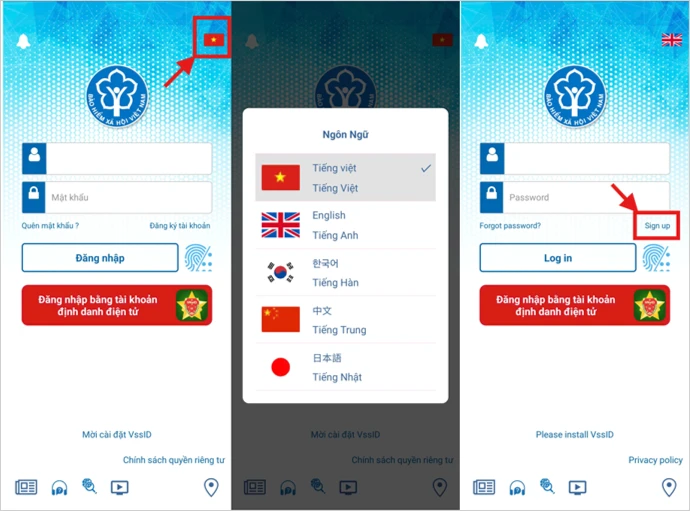
Open the application. Tap the flag icon in the top-right corner, select your preferred language, then tap Sign up.
Step 3: Complete your personal information
Enter your details exactly as registered with Vietnam Social Security. When all information is complete, tap Continue.
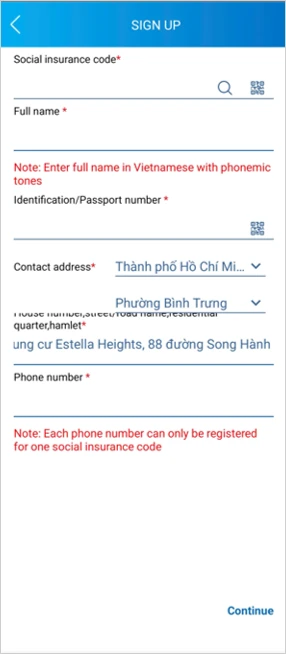
- Social insurance code: ask your HR team, check the cover of your social insurance book, or use the official Vietnam Social Security online lookup. The lookup page is only available in Vietnamese; browser translation may be required.
- Full name: enter the name exactly as registered with Vietnam Social Security. Confirm the registered name order with HR if it differs between your passport and work permit.
- Identification / passport number: enter your current passport number.
- Contact address: select your current province/city and ward/commune, then enter the full address. Use the address shown on your temporary or permanent residence confirmation where possible.
- Phone number: enter an active Vietnamese phone number.
What to check: Fields marked with an asterisk are mandatory. If the application rejects your information, confirm your registered details with HR before resubmitting.
Step 4: Upload your portrait and identification images
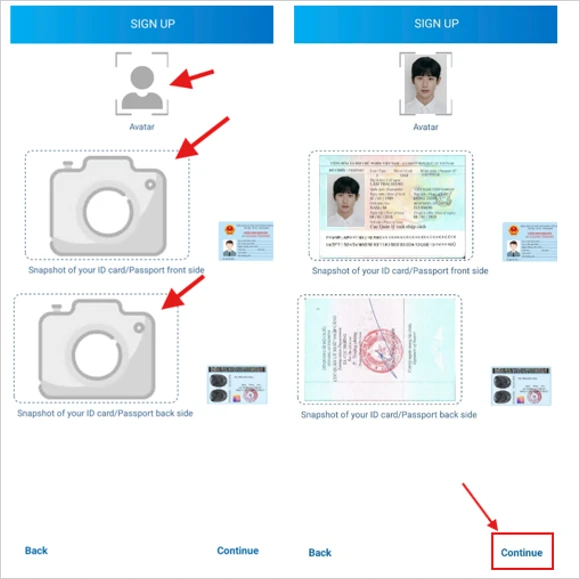
Tap each image area to take a photo of the requested documents:
- Avatar
- Passport: front side
- Passport: back side
After uploading the images, tap Continue. Ensure the images are clear, complete and free from glare.
Practical tip: Take the photos in good lighting, with the full document inside the frame and all text readable. Unclear images are a common reason for rejected registrations.
Step 5: Select the agency and verify your email
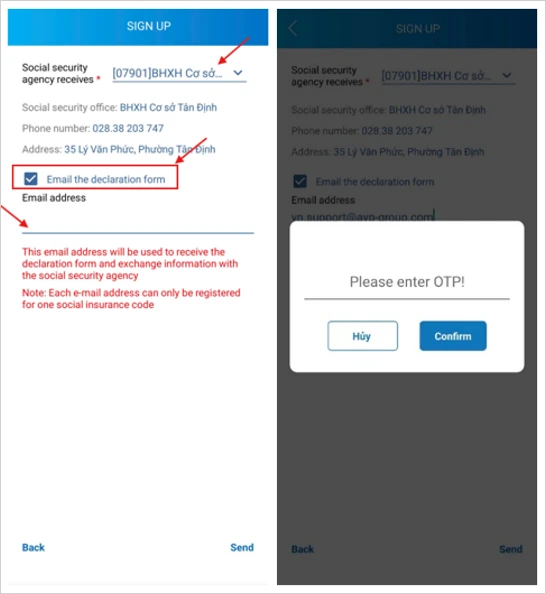
Under Social security agency receives, select the social security office that manages your employer's social insurance registration. Confirm the correct office with HR before submitting.
Tick Email the declaration form, enter your personal Email address, then tap Send. An OTP will be sent to the registered email address. Enter it and tap Confirm.
What to check: Use a personal email address you can continue to access after leaving your employer. The account credentials and future notifications are sent to this address.
Step 6: Wait for account approval
If the submitted information matches the social insurance records, the registered email address should receive the account username and password within approximately 1 to 3 working days. Use these credentials to log in to VssID.
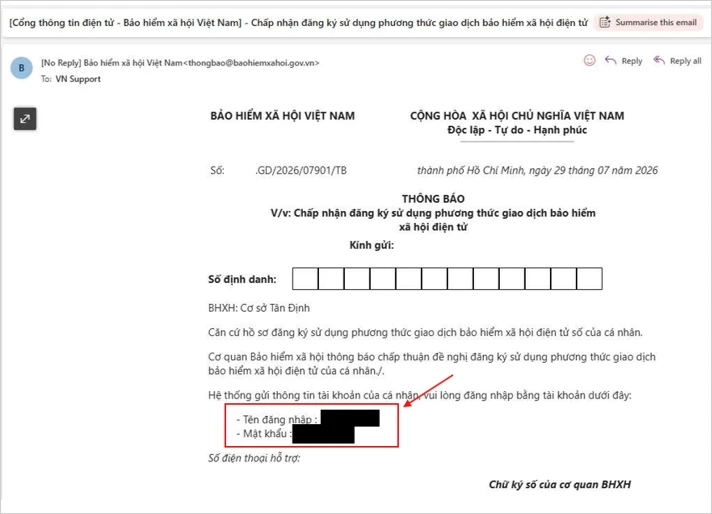
What to check: Processing times are indicative and depend on the competent social security office. If no email is received, confirm with HR that your registered records match the details submitted.
Part 2: Using the main VssID functions
The core functions available after you log in with the credentials received by email.
- Change your password
- Use the digital health insurance card
- Review your social insurance participation history
- Check recorded benefit information
- View annual medical treatment records
1. Change your password
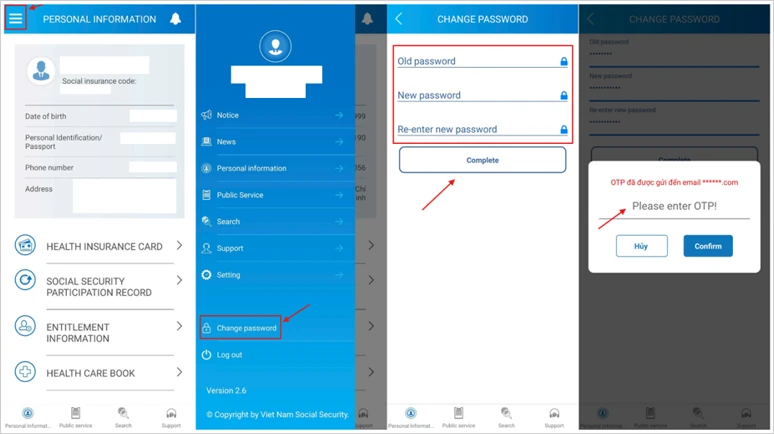
Open the menu icon in the top-left corner and select Change password. Enter your Old password, New password and Re-enter new password, then tap Complete. Enter the OTP sent to the registered phone number and tap Confirm.
2. Use the digital health insurance card
After logging in, select HEALTH INSURANCE CARD, then tap Image of the HI card. Present the digital card at the medical facility when registering for medical care.
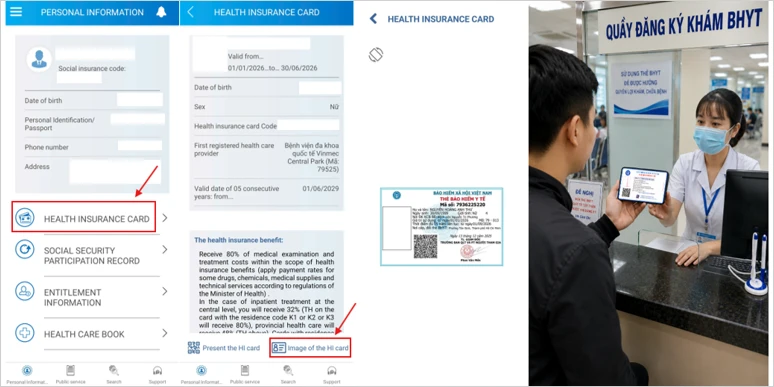
What to check: The card displays the first registered health care provider. Treatment at another facility may require a referral, except in qualifying emergency cases and other cases permitted under applicable health insurance rules.
3. Review your participation history
Select SOCIAL SECURITY PARTICIPATION RECORD. Choose the relevant insurance category, then tap the eye icon to view the detailed record.
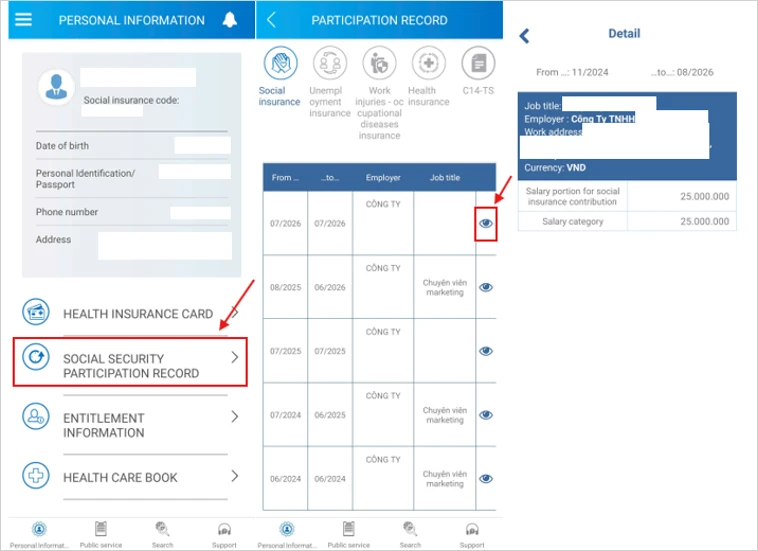
What to check: Foreign employees are not subject to unemployment insurance in Vietnam. Therefore, your unemployment insurance participation should be blank.
4. Check recorded benefit information
Select ENTITLEMENT INFORMATION, then choose the applicable category:
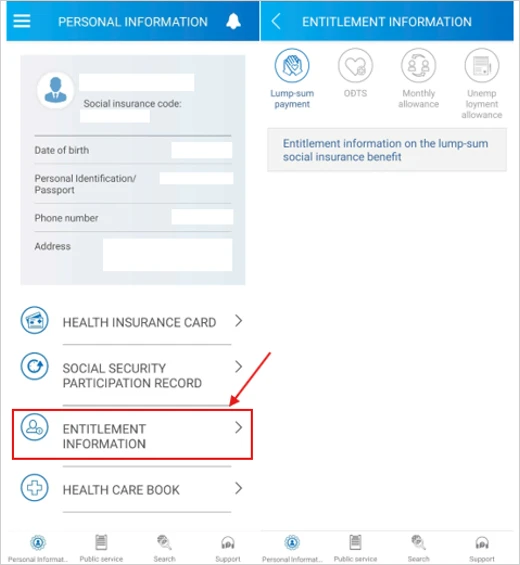
| Category | What it covers |
|---|---|
| Lump-sum payment | Lump-sum social insurance benefit. |
| ODTS | Sickness and maternity benefits. |
| Monthly allowance | Monthly pension or other recurring benefits. |
| Unemployment allowance | Unemployment benefit information, where applicable. |
What to check: VssID generally displays benefits that have been claimed, are being processed or have already been recorded. Unemployment allowance does not apply to foreign employees.
5. View annual medical treatment records
Select HEALTH CARE BOOK, open Record, select the relevant year and tap the eye icon to view admission, discharge and treatment details.
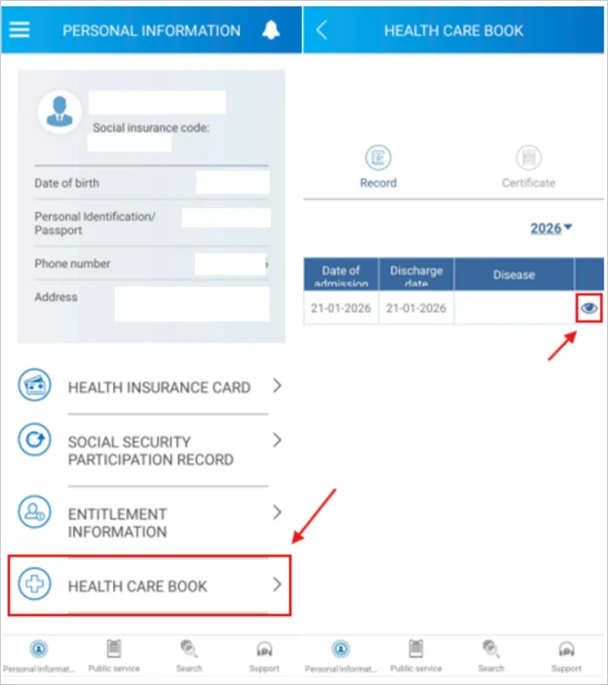
What to check: Records shown depend on data transmitted by the health care facilities and recorded by Vietnam Social Security. Recent visits may take time to appear.
Additional VssID functions
The application also provides public services, lookup tools and support channels.
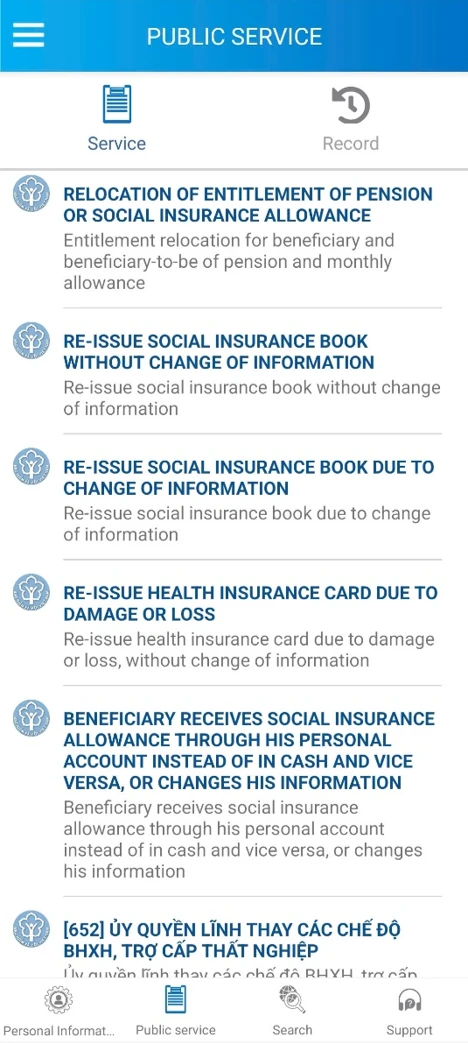
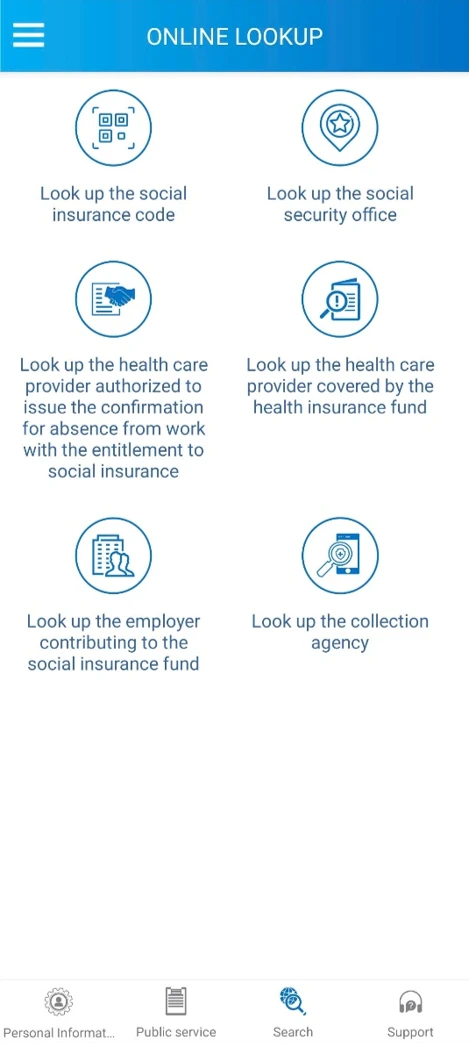
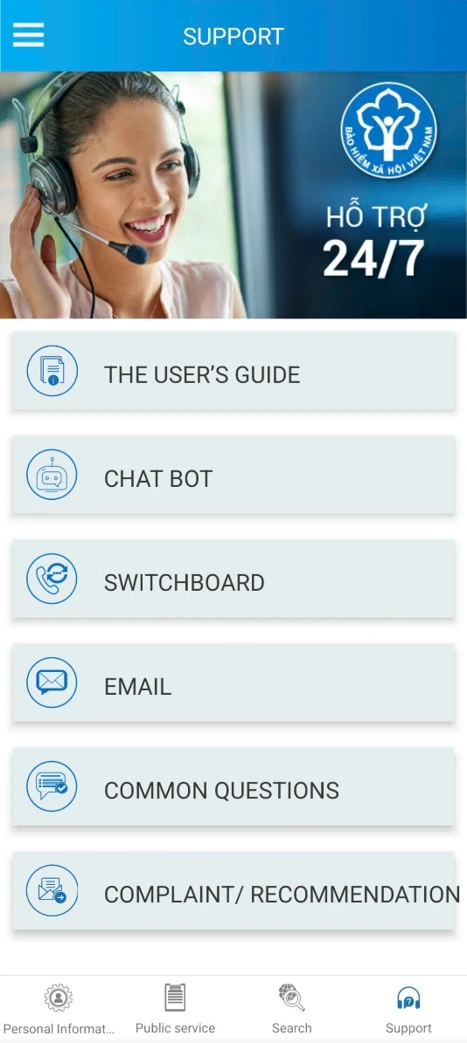
| Group | Available functions |
|---|---|
| Public service | Re-issue social insurance book without change of information; re-issue social insurance book due to change of information; re-issue health insurance card due to damage or loss. |
| Online lookup | Social insurance code; social security office; health care provider authorised to issue confirmation of absence from work; health care provider covered by the health insurance fund; employer contributing to the social insurance fund; collection agency. |
| Support | The user's guide; chat bot; switchboard; email; common questions; complaint / recommendation. |
Important notes before you finish
- VssID screens and menu names may change after application updates. Where a screen differs from this guide, follow the equivalent field on the current version.
- If the application rejects your information, first confirm your registered social insurance code, name, passport number and managing social security office with HR.
- The information shown in VssID reflects the records held by Vietnam Social Security. Corrections are processed by the competent social security office.
How Truzand supports employees
For foreign employees ending their employment in Vietnam, Truzand supports the lump-sum social insurance claim process: eligibility review based on the information provided, document checklist and document review, application preparation, submission coordination with the competent social security office, and submission, status and payment records. Eligibility, required documents and processing times depend on the employee's circumstances, the competent social security office and applicable regulations.
Estimate your lump-sum benefit: Truzand provides a free online calculator to estimate the lump-sum social insurance benefit based on your contribution history. For the eligibility rules, read about one-time social insurance for foreign employees.
Managing social insurance registration, records and employee questions across a foreign workforce in Vietnam? Truzand supports employers and their employees with practical HR, payroll and social insurance administration.
Talk to TruzandWhat this does not cover
This guide is provided for general information based on the VssID application and publicly available Vietnam Social Security processes at the time of writing. It is not legal or tax advice. Screens, requirements and processing times may vary depending on the employee's circumstances, the competent social security office, current regulations and the version of the application in use. Where support is provided, the final scope depends on the agreed engagement.
Official resources
- Vietnam Social Security: VssID features and utilities.
- Vietnam Social Security: multilingual access for foreign participants.
- Vietnam Social Security public service portal: use the current registration instructions and contact the receiving office for passport-based registration.